-
-
학생용 무료 소프트웨어에 액세스하기
차세대 엔지니어에게 힘을 실어주는 Ansys
학생들은 세계적 수준의 시뮬레이션 소프트웨어를 무료로 이용할 수 있습니다.
-
지금 바로 Ansys에 연결하십시오!
미래를 설계하기
시뮬레이션이 다음 혁신을 어떻게 지원할 수 있는지 알아보려면 Ansys와 연결하십시오.
무료 트라이얼
제품 및 서비스
학습하기
회사 정보
Back
제품 및 서비스
ANSYS BLOG
August 12, 2021
Simulation Process and Data Management Made Easier
In 2021 R2, Ansys Minerva, powered by Aras, enhances collaboration with custom dashboards that communicate relevant information efficiently among teams and ships a host of rich user interface enhancements, greatly improving engineering productivity.
With enhanced integration between Ansys optiSLang and Minerva, democratization of simulation automation is just a few clicks away, enabling experts and nonexperts to reap the benefits of simulation.
Customize with Query Builder
The new Query Builder enables you to easily query and collect information stored in Minerva.
Starting from a specific object type, you can select its properties to rearrange, group, format and then filter them to create a dataset containing the results you’re expecting. You can reuse these results as input data for widgets in the new Dashboards.
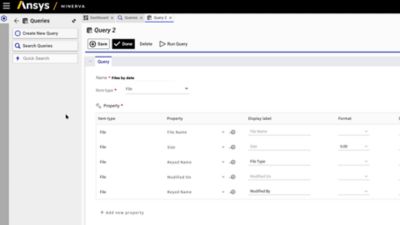
Query Builder
Dashboards Provide Quick Access to Data
In Ansys Minerva 2021R2, the Dashboards have been completely revamped to provide a new user experience.
With Dashboards 2.0, create role-based dashboards using the different widget types, such as the Folder Widget, Markdown/Html Widget, My Assignments, KPI, and others. The Report Widget enables you to reuse Queries created with the Query Builder, and display rich information using advanced options for charting, pivot mode and many more.
Dashboards in Ansys Minerva, powered by Aras
Get a Better User Experience
Minerva 2021R2 improves the global user experience with many enhancements such as:
- A new Favorites section
- The Comparison View is now available on the Change Notice panel
- Additional checks for Task Completion
- New icons
- Pan and zoom capabilities for the Digital Thread graph
- Improved metadata extraction to extend configurability and coverage of simulation file types
Choose a favorite
Pan and zoom
To learn more about these and all other 2021 R2 innovations, view our on-demand webinar, Ansys 2021 R2: What’s New in Ansys Minerva, Powered by Aras.
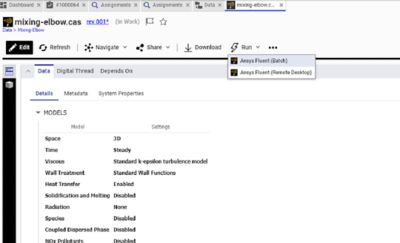
Run from file view in Ansys Minerva