Synopsys and Ansys power the future of innovation—connecting silicon to systems.

Bridging 3D imaging and computational analysis across industries
In modern engineering, the ability to move seamlessly from a physical scan to a computational simulation is a competitive necessity. Whether you’re analyzing the porosity of a rock sample, inspecting an additively manufactured aerospace part, or reverse-engineering a legacy component with no computer-aided design (CAD) history, the efficiency of workflow from raw 3D image data to simulation-ready models defines how fast and accurately you can iterate.
At the center of this workflow, Ansys Simpleware volumetric image processing software stands out as a leading platform for 3D image processing, analysis, and model generation designed for CAD, computer-aided engineering (CAE), and 3D-printing workflows. Let's walk through the core capabilities of Simpleware software and explore real-world applications that demonstrate its impact and accelerate your design workflow.
What Is Simpleware Software?
Simpleware software is a software suite that takes 3D image data — typically from computerized tomography (CT), micro-CT, synchrotron imaging, magnetic resonance imaging (MRI), or ultrasonic techniques — and converts it into usable engineering models. The key stages of this workflow include:
- Image segmentation — identifying and isolating regions of interest (for example, solid versus pore space or fiber versus matrix) using artificial intelligence (AI)-enabled automation and manual tools.
- Analysis and reporting — extracting quantitative measurements, such as volume fractions, orientation statistics, and geometric deviations.
- Model generation — producing simulation-ready meshes (finite element (FE)/computational fluid dynamics (CFD)) or exporting to STL, 3MF, NURBS CAD, and other formats for downstream use.
- Full customization — scripting via Python/MATLAB, custom graphical user interface (GUI) workflows, and AI-driven automation for high-throughput applications.
What differentiates Simpleware software is its ability to generate topologically accurate, computationally efficient meshes directly from image data — enabling FE analysis from scans with reduced time to simulations.
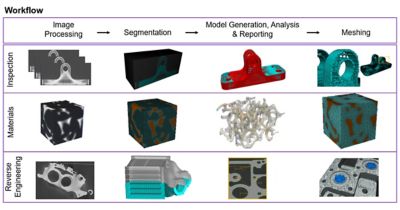
Industrial computerized tomography (CT) image-based modeling
The Scan-to-Simulation Workflow With Ansys Simulations
The fundamental workflow that Simpleware software enables looks like this:
The workflow starts from the original part through CT scanning to generate 3D image data, which is then segmented and converted into a mesh, ultimately producing a simulation-ready model.
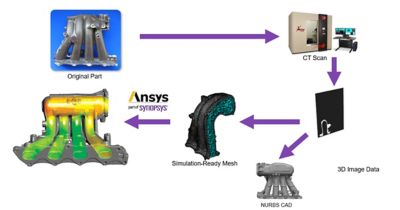
Simpleware software enables scan-to-simulation workflows.
Alternatively, Simpleware software can also produce NURBS (non-uniform rational B-splines) CAD models from image data. They bridge the gap between image-based and CAD-based simulation paradigms. This dual-path capability is critical. It means that engineers aren’t locked into a single downstream toolchain.
When paired with multiphysics simulation tools like Ansys Fluent fluid simulation software, the Ansys Workbench simulation integration platform, and Ansys LS-DYNA nonlinear dynamics structural simulation software, Simpleware software unlocks a broad range of applications:
- Research and development (R&D) image-based simulation — direct meshing from scan data
- CAD-based simulation — reverse-engineered CAD models fed into traditional solvers
- Inspection and nondestructive testing (NDT) — comparing as-built geometry with design intent
- Materials and digital rock physics — characterizing microstructure at the micron or nano scale
- Service life assessment — evaluating the impact of defects, damage, or wear on part performance
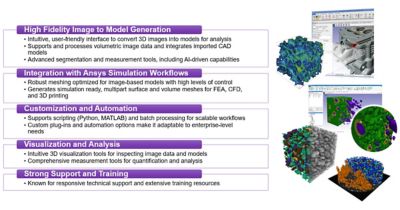
Simpleware software advantages
Deep Dive: Key Application Areas
Here are examples of applications that customers can benefit from using Simpleware software.
1. Material Characterization
Understanding material behavior at the microstructural level is essential for performance optimization for oil and gas, geomechanics, aerospace, automotive, and industrial applications.
Simpleware software processes micro-CT and nano-CT data to enable a scan-inspect-simulate the workflow at the micron or nano scale.
This is particularly valuable for composite materials. For example, glass fiber-reinforced polymers (GFRPs) can be scanned to extract:
- Fiber orientation and crimp angle measurements
- Volume fraction statistics
- Ply-level structural analysis for woven and nonwoven architectures
By combining imaging with simulation, engineers gain a depth of understanding that traditional coupon testing alone cannot provide.
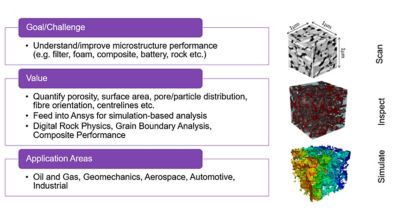
Material characterization for performance optimization
2. Digital Rock Physics
One of Simpleware software’s flagship applications is in pore-scale modeling for oil and gas, geotechnical, and environmental engineering.
A typical workflow involves:
- Scanning a porous core sample via micro-CT (for instance, at 4.3 µm resolution)
- Segmenting solid and pore space
- Meshing the complex network of air voids
- Running CFD simulations (for example, in Fluent software) to derive macroscopic parameters
Pore-scale fluid flow simulations yield hydraulic conductivity, isotropy, tortuosity, and dispersivity — parameters central to Darcy’s law and critical for reservoir characterization.
At the field scale, Simpleware software also bridges the gap between seismic data and FE meshes, enabling analysis of offshore foundation structures, geotechnical site investigations, and reservoir models. Simpleware software can import the faceted surfaces converted from point cloud data of fault lines to produce a formation mesh model.
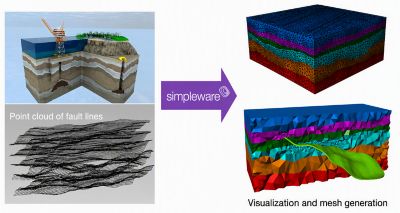
An oil and gas subsurface at field scale
3. Thermal and Fluid Transport in Porous Media
Case studies highlight Simpleware software’s strength in thermal-fluid applications:
- Sintered wicks: Micro-CT scanning at 5.5 µm resolution, followed by segmentation and CFD simulation, enables prediction of static effective thermal conductivity, friction factor, permeability, and interfacial heat transfer.
- Copper foam heat exchangers: Simpleware software segments and meshes random foam structures from micro-CT data while Fluent software models hydraulic and thermal behavior. The combined workflow demonstrates enhanced heat transfer rates when using metal foams and nanofluids, contributing to more compact, energy-efficient heat exchangers.
- Catalytic flow in pellet beds: Multiscale 3D data (from XMT, DBFIB/FIBSEM, and electron tomography) is processed in Simpleware software and exported to Fluent software for permeability calculations, determining the effect of porosity on flow behavior.
- Digital packed beds: A novel workflow uses Ansys Rocky particle dynamics simulation software to generate packed beds of random particle sizes and shapes in STL format. It alleviates the need to physically generate the packed beds and scanning. Simpleware software directly imports the STL to produce a mesh of the pore space to feed Fluent software for flow and/or thermal simulations on the pore scale. This workflow enables the establishment of a digital packed-bed simulation database library for training AI models and digital twins for rapid field analysis.
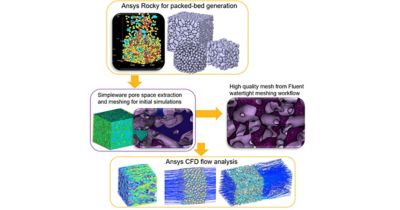
Digital packed beds
4. Inspection, NDT, and Service Life Assessment
For high-value manufactured parts used in oil and gas, geomechanics, aerospace, automotive, and industrial applications, the ability to perform NDT is critical. Simpleware software enables automated workflows for defect detection in high-volume manufacturing:
- A nearly perfect, defect-free part is scanned and stored as a reference.
- Production parts are CT-scanned in predetermined orientations.
- Simpleware software automatically segments even poor-quality CT data using AI.
- Surface deviation analysis identifies potential defect locations.
- Regions of deviation are tabulated for inspection guidance.
This as-designed versus as-built comparison extends beyond simple geometry checks. By generating image-based meshes and running simulations on actual part geometry (including defects like cracks and pores), engineers can quantify the real structural impact. Studies have shown differences of up to 23% in maximum principal stress between CAD-based and image-based simulations.
5. Additive Manufacturing (AM) Quality Control
AM creates optimized designs (lightweight, organic geometries) that are inherently difficult to inspect for internal defects. Simpleware software addresses this by:
- Segmenting CT data of AM parts to generate simulation-ready meshes capturing surface and structural details
- Enabling Von Mises stress simulations comparing as-designed CAD to as-built reality
- Streamlining the design feedback loop for image-based design optimization
A specific application is gyroid lattice heat exchanger optimization, which is a simulation-driven design optimization of high-performance, lightweight heat exchangers using gyroid structures to maximize heat transfer while minimizing flow resistance and material use. In this use case, the combined design/simulation/CT inspection/testing workflow enables rapid new designs while using less material and reducing physical testing requirements. Tools from Ansys, part of Synopsys, and Simpleware software support this workflow by converting complex geometries or scan data into simulation-ready mesh models, running CFD and thermal analyses, and enabling rapid design iteration to identify the optimal structure.
6. Reverse Engineering
When no CAD exists — whether for legacy parts, third-party components, or organic geometries — Simpleware software provides a path from scan to model. The filter pack reverse engineering example demonstrates the workflow as follows:
- Micro-CT scanning a legacy filter pack
- Processing in Simpleware software to generate 3D image renderings and mesh models
- Exporting to Ansys CFD simulation to evaluate performance
This enables rapid, accurate reverse engineering without the manual CAD reconstruction that traditionally bottlenecks such projects.
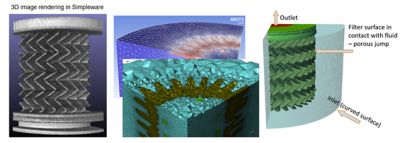
Filter reverse engineering: from micro-CT scan images to Simpleware software to Ansys computational fluid dynamics (CFD) simulation
7. Advanced Composites and NDT
Simpleware software extends into specialized NDT domains, such as 3D ultrasonic analysis of carbon-fiber composites. Multi-ply structures with alternating fiber orientations can develop defects — incorrect layup, ply waviness, resin pools, delaminations, and cracks. By reconstructing 3D ultrasonic waveforms and processing them in Simpleware software, engineers can detect and characterize defects that affect structural integrity.
The auxetic foam application demonstrates another advanced use case: Synchrotron XMT data at 0.003 mm resolution is processed in Simpleware software (mesh generation in about 10 minutes), then analyzed via CFD in Fluent software and fluid-structure interaction/impact simulation in LS-DYNA software.
What Makes Simpleware Software Stand Out
A number of core strengths differentiate Simpleware software in this space:
AI-enabled segmentation: accelerates image-to-model creation and handles even poor-quality CT data
A robust meshing engine: generates topologically accurate, computationally efficient meshes from complex geometries
Multiformat export: STL, 3MF, NURBS CAD, and direct simulation mesh export
Python/MATLAB scripting: enables custom scan-to-simulation workflow automation
Data management via Ansys Minerva simulation process and data management software: provides traceability and data management across the workflow
Broad solver compatibility: native integration with Ansys tools (Fluent, Workbench, and LS-DYNA software) and other solvers
Engineering the Future
The trajectory is clear: As 3D imaging becomes more accessible (faster scanners, higher resolutions, lower costs) and simulation demands grow more complex, the bottleneck increasingly sits in the image-to-model workflow. Simpleware software’s combination of AI-driven automation, robust meshing, and broad export capabilities positions it as a critical enabler for industries ranging from aerospace and energy to biomedical and materials science. Furthermore, when combined with multiphysics simulation tools, Simpleware software enables a wide range of advanced applications. The convergence of additive manufacturing, digital twins, and physics-based simulation will only increase demand for tools that can faithfully capture real-world geometry — defects and all — and translate it into actionable engineering insight.
Learn more about Ansys Simpleware 3D image processing software.

Just for you. We have some additional resources you may enjoy.
The Advantage Blog
The Ansys Advantage blog, featuring contributions from Ansys and other technology experts, keeps you updated on how Ansys simulation is powering innovation that drives human advancement.