Synopsys and Ansys power the future of innovation—connecting silicon to systems.
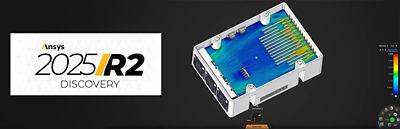
Each year, Ansys Discovery simulation software evolves to deliver faster, smarter, and more accessible simulation capabilities that bridge the gap between design and analysis. With GPU-accelerated solvers, real-time feedback, and intelligent automation, Discovery software enables engineers to make better design decisions earlier in the product development cycle.
Discovery 2025 R2 marks a major step forward, introducing new tools that improve both speed and accuracy across the board. This release brings significant structural simulation enhancements, including the random vibration capability and expanded post-processing options. Discovery 2025 R2 also debuts the Ansys Engineering Copilot feature, an AI-powered assistant that delivers real-time guidance directly within the software. With expanded physics coverage, automated meshing, and smarter workflows, Discovery software continues to redefine what’s possible in upfront simulation.
Simulation and Physics Advancements
One of the most impactful additions to Discovery 2025 R2 is the new random vibration simulation capability. This feature enables users to rapidly evaluate the structural response to nondeterministic loading conditions commonly encountered in real-world scenarios such as roadway vibration, aircraft takeoff, or wave impact. Users can specify base excitation power spectral density (PSD) on fixed supports, defining inputs in terms of acceleration, velocity, or displacement, with support for constant damping ratios. With up to 20 vibration modes available, engineers can post-process 1-, 2-, or 3-sigma results for displacement, stress, velocity, and acceleration, along with PSD output charts for deeper analysis. This empowers teams to predict structural behavior under uncertain conditions early in the design cycle, improving durability insights and reducing late-stage design risk.
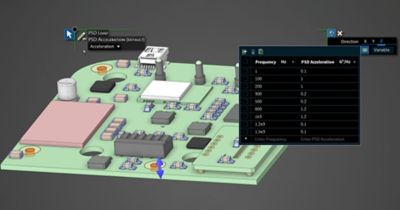
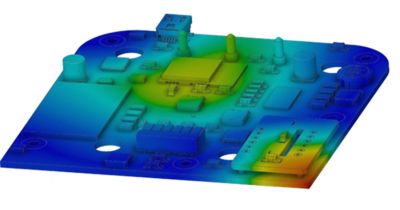
Random vibration simulation of a printed circuit board (PCB)
Discovery 2025 R2 also introduces the “Local Coordinate Systems for Structural Results” feature. This enables engineers to add monitors and view contour results using Cartesian or cylindrical local coordinate systems, greatly enhancing post-processing for pressure vessels and structures requiring hoop, radial, and axial component results.
For complex bolted assemblies, user-defined bolts are now supported. Users can define custom bolt sizes, materials, and properties and save them to a local library. This bolt data can be easily transferred to Ansys Mechanical structural finite element analysis (FEA) software from either the Prepare or Simulation tab, streamlining workflows for bolted connections. The "Assign" tool also includes a new max hole coaxial offset tolerance, improving the detection of bolts in coaxial holes with small offsets and enhancing the definition of idealized bolts for imperfect geometries.
A new structural result, “Maximum Shear Stress,” has been added, displaying (S1-S3)/2 and offering the ability to evaluate components transferring torque loads like drive shafts and camshafts. Additionally, structural reaction enhancements now include new monitors for Moment reactions, improving the evaluation of static equilibrium and enabling better definition of reaction locations by selecting a support or displacement condition from the physics tree.
Meshing Enhancements
Discovery 2025 R2 brings significant fluids meshing enhancements. Body of influence size controls and a sharp edge capture option give users increased flexibility for controlling mesh density, improving accuracy, and optimizing GPU memory usage. The new “Sharp Edge Capture (Explore)” option specifically enhances sharp feature resolution and solution accuracy for fluids meshing, leading to better resolution of inlets and outlets and improved monitor results.
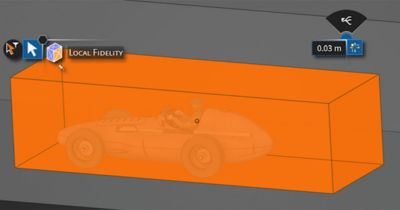
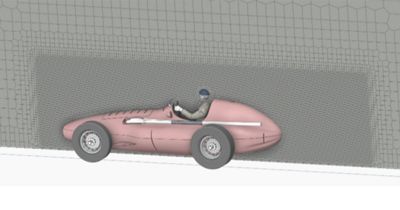
The body of influence tool enables volumetric mesh fidelity in areas of need.
New structural meshing defaults in the Refine stage help improve meshing robustness for a wide variety of model geometries, especially those with many holes, fillets, thin solids, and sweepable bodies. This results in enhanced mesh quality for thin solid structures, with test data showing a 50% reduction in mesh failure. Failed mesh regions are now highlighted in red, enabling faster issue identification and giving users the ability to quickly locate and resolve problematic areas. These improvements help reduce setup time and increase success rates, making the meshing process more intuitive and reliable for everyday use.
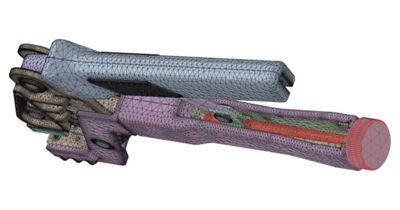
You can now easily locate meshing issues and repair them before transferring to Ansys Mechanical structural finite element analysis (FEA) software.
The release also facilitates the transfer of mesh settings to Mechanical software. Both global- and local-fidelity mesh settings are transferred, enabling model setup and meshing in Discovery software with seamless transfer to Mechanical software. Shared topology is now supported for structural simulation, treating ST in the “Explore” option as bonded contact and resulting in a conformal mesh in the Refine stage. This also facilitates sweep meshing and allows for verification of shared topology and model setup as part of model preparation for Mechanical software.
Internal Fans for Real-World Cooling Scenarios
A brand-new addition to Discovery 2025 R2 is the ability to simulate internal fans for electronics cooling and other airflow applications. Users can place fans in cylindrical or rectangular fluid regions, choose between performance curves or constant pressure rise, and monitor parameters like flow rate. With support for both shrouded and unshrouded configurations and a built-in library of common electronics fans, engineers can quickly simulate realistic cooling effects within enclosures. This feature significantly improves thermal management accuracy by bringing real-world airflow behavior directly into the simulation process, with no manual workarounds required.
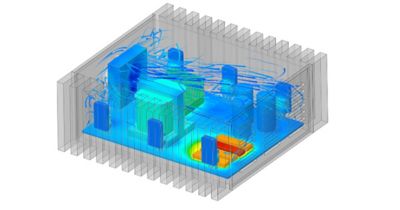
Avionics box cooled with an internal fan
Workflow and Usability Improvements
This release introduces the Ansys Engineering Copilot feature, a secure AI-powered assistant available directly within the Discovery UI. The Engineering Copilot tool connects users to Ansys Innovation Courses, forums, support, and AnsysGPT (with AI+ licensing) to answer simulation questions, provide step-by-step guidance, and accelerate onboarding. Whether you're troubleshooting or exploring a new workflow, the Engineering Copilot tool helps reduce time spent searching and boosts simulation confidence across skill levels.
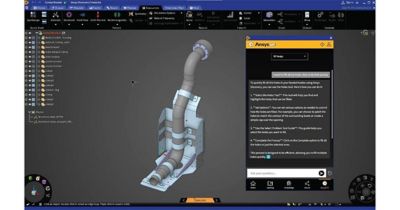
In Ansys Discovery 2025 R2, you can receive instant tool guidance with the Ansys Engineering Copilot tool.
To improve usability, Discovery software now features a global search bar to quickly find tools, conditions, and files. A new Help tab provides direct access to documentation and learning resources, while the new ability to save animation in MP4 format makes it easy to include simulation visuals in presentations and reports.
The “Tolerant Volume Extraction” tool now handles faceted geometry with small gaps between bodies, enabling cleaner fluid domain extraction from messy computer-aided design (CAD) models. This is especially useful for teams working with imported or legacy designs.
Finally, performance and modeling enhancements in Ansys 2025 R2 make Discovery software smoother and more responsive. Users can pause simulation updates from the physics tree while editing geometry; frame rates are improved for remote desktop users; and named selections can now be grouped into folders, ideal for large assemblies with hundreds of selections.
A Smarter, Faster Way To Design
Discovery 2025 R2 represents a meaningful leap forward in how engineers approach simulation and design. From new physics like random vibration and internal fans to smarter meshing and intuitive AI-guided workflows, this release gives engineers the confidence to explore more ideas, iterate faster, and deliver high-impact results from the start of the product development cycle. Join the upcoming “Ansys 2025 R2: Ansys Discovery What’s New” webinar and see these innovations in action.


The Advantage Blog
The Ansys Advantage blog, featuring contributions from Ansys and other technology experts, keeps you updated on how Ansys simulation is powering innovation that drives human advancement.