-
-
학생용 무료 소프트웨어에 액세스하기
차세대 엔지니어에게 힘을 실어주는 Ansys
학생들은 세계적 수준의 시뮬레이션 소프트웨어를 무료로 이용할 수 있습니다.
-
지금 바로 Ansys에 연결하십시오!
미래를 설계하기
시뮬레이션이 다음 혁신을 어떻게 지원할 수 있는지 알아보려면 Ansys와 연결하십시오.
국가
무료 트라이얼
제품 및 서비스
학습하기
회사 정보
Back
제품 및 서비스
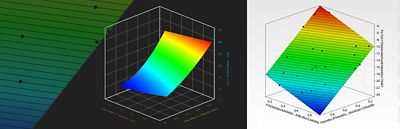
Enjoy faster design exploration with artificial intelligence (AI) in Ansys optiSLang 2026 R1.
Engineering teams today face pressure from every direction. Products are becoming more connected, electrified, and software-driven while development timelines rarely keep pace with this rising complexity. As a result, teams must make decisions amid more variables, higher-fidelity models, and tighter performance criteria, often using workflows not built for this scale. Extracting data, calibrating models to test measurements, comparing design variants, and ensuring traceability all take time. When each step requires manual orchestration or tool switching, the friction adds up quickly.
This is one reason that design exploration and optimization have become so important across industries. When engineers have tools that help them move from a conceptual design to a defensible decision smoothly and repeatably, development becomes more predictable. But the value materializes only when the workflow is accessible, well integrated with simulation tools, and straightforward to automate.
That challenge sits at the center of Ansys optiSLang process integration and design optimization software 2026 R1. With tighter integration across the Ansys, part of Synopsys, ecosystem; a more stable calibration engine; improved data handling; and expanded AI-driven capabilities, the release focuses on reducing friction in real engineering workflows.
Why Traditional Approaches Create Bottlenecks
Most engineering teams already use some form of automated studies: parameter sweeps, optimization scripts, surrogate models, or sensitivity analyses. But many of these efforts begin as local solutions, such as a set of Python scripts, a collection of spreadsheets, or a solver-specific tool that doesn’t scale across the full workflow. These solutions often work for small studies but struggle as the number of parameters increases, more physics are added, or test data must be integrated for calibration.
One consistent pain point is data handling. Extracting multidimensional 3D results, importing time-series signals, and preparing them for analysis can be substantial overhead. When this data must be exchanged among several tools or passed through custom scripts, the process becomes fragile. Even small changes in mesh settings, geometry, or boundary conditions can break the chain.
Calibration is another recurring challenge. Many teams rely on general-purpose optimization algorithms to match model predictions to measured or target responses. These methods can be sensitive to noise or converge slowly, especially with complex signals. As a result, engineers sometimes need to hand-tune algorithm settings or repeat analyses several times to achieve a stable match.
Finally, openness matters. If a workflow can’t run headless on a cluster or if the scripting interface feels opaque, it’s harder to turn optimization into a routine part of engineering. Teams default to manual steps because automation doesn’t naturally fit into their existing environments.
These limitations don’t reflect a lack of capability; they reflect a lack of integration. What’s needed is a platform that aligns simulation, AI, optimization, and scripting into one consistent experience.
What’s New in Ansys optiSLang 2026 R1
The release focuses on three themes: Connect, optimize, and be open.
Connect: Stronger Links Across the Ansys Ecosystem
Ansys optiSLang 2026 R1 expands and deepens its connections to other Ansys tools, improving workflow consistency and reducing manual handling.
- New and enhanced links to Ansys Rocky particle dynamics simulation software, Ansys FreeFlow smoothed-particle hydrodynamics (SPH) simulation software, and Ansys LS-OPT design optimization and uncertainty quantification for Ansys LS-DYNA help streamline data and simulation orchestration.
- The addition of an Ansys SimAI cloud-enabled AI platform solver node enables users to generate design variations, train AI models, and incorporate them directly into optimization workflows — all inside optiSLang software.
- Improved data-extraction nodes and VTK file import simplify the handling of multidimensional and 3D simulation results.
These updates reduce friction when moving between solvers and make it easier to build full-fidelity or hybrid simulation-AI workflows without leaving optiSLang software.
Optimize: Improved Calibration and AI-Driven Modeling
For teams working with test data, transient responses, or nonlinear behavior, calibration can make or break a workflow. 2026 R1 strengthens optiSLang software’s core optimization capabilities with:
- A new Damped Least Squares (DLS) method that increases calibration accuracy and stability, especially when matching noisy or measured signals.
- Integration of this method into the One-Click Optimizer (OCO), making calibration far more accessible — even for users who don’t regularly tune algorithm settings.
- New AI-based signal-modeling tools that enhance predictions for complex time-series and curve-based responses, helping reduce the number of computationally expensive simulation runs.
These features make it easier to explore design variations, validate models against physical data, and build confidence in optimization results.
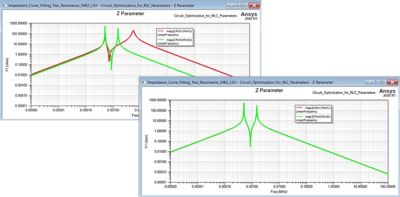
One Click Optimizer (OCO) Initial Design (top image) vs Optimized Design 2026 R1 (bottom image)
Be Open: Easier Automation and a More Flexible Installation
The release also focuses on openness and maintainability.
- The pyoptiSLang Python interface is more intuitive, with clearer algorithm configuration and an official quick-reference cheat sheet.
- A lighter, more modular installation makes optiSLang software easier to deploy in distributed environments.
- The new Core Headless option supports automated use of optiSLang software inside other Ansys products or external pipelines.
These improvements reduce the barrier to automation and make it easier for advanced users to create workflows that scale.
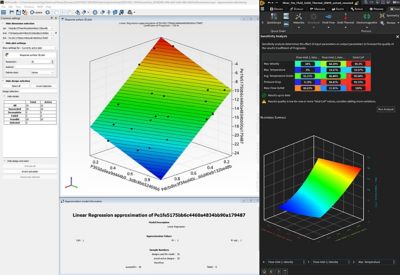
Ansys optiSLang process integration and design optimization software “inside” Ansys Discovery 3D product simulation software
A Workflow Scenario That Engineers Will Recognize
Imagine a team preparing for a design review. The team has several candidate geometries, competing load cases, and a measured transient signal that the simulation must match. Previously, the team might have run each case manually, exported time-series files, and tuned parameters by hand to achieve alignment.
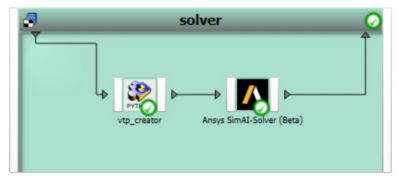
The Ansys SimAI cloud-enabled artificial intelligence (AI) platform is fully integrated into the optiSLang workflow.
With optiSLang 2026 R1, the workflow is more direct. The engineer creates a project that includes geometry variations, solver connections, and a data-extraction node reading VTK files. The engineer trains an AI model in the SimAI platform to predict responses between high-fidelity runs. The DLS method calibrates the model to match measured behavior, all in the updated OCO.
If the workflow needs to run overnight, the engineer can script it in the pyoptiSLang interface and execute it using the Core Headless installation. By the next morning, the team is reviewing convergence plots and candidate designs rather than stitching together spreadsheets.
This is the kind of practical refinement that the release is built to support: making high-value workflows easier to run, adjust, and automate.
Lowering Barriers
2026 R1 of optiSLang software lowers barriers to design exploration by improving integration, stabilizing calibration, and enabling easier automation.
To see these updates in action, join the webinar “Ansys 2026 R1: Ansys optiSLang What’s New?” on April 2, 2026.

Just for you. We have some additional resources you may enjoy.
Watch the Webinar
To see these updates in action, join the webinar “Ansys 2026 R1: Ansys optiSLang What’s New?”

The Advantage Blog
The Ansys Advantage blog, featuring contributions from Ansys and other technology experts, keeps you updated on how Ansys simulation is powering innovation that drives human advancement.