Synopsys and Ansys power the future of innovation—connecting silicon to systems.
-
-
학생용 무료 소프트웨어에 액세스하기
차세대 엔지니어에게 힘을 실어주는 Ansys
학생들은 세계적 수준의 시뮬레이션 소프트웨어를 무료로 이용할 수 있습니다.
-
지금 바로 Ansys에 연결하십시오!
미래를 설계하기
시뮬레이션이 다음 혁신을 어떻게 지원할 수 있는지 알아보려면 Ansys와 연결하십시오.
무료 트라이얼
제품 및 서비스
학습하기
회사 정보
Back
제품 및 서비스
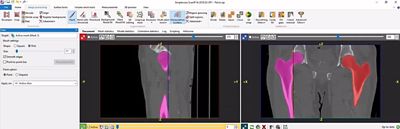
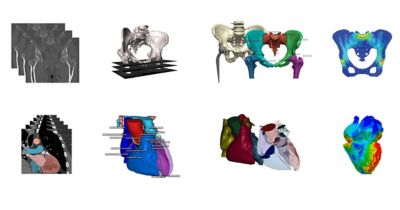
When processing cardiovascular and orthopedics scan data from MRI and CT, the segmentation process can be very time consuming. The quality of the scan data often makes it hard to identify important regions of interest, while final models exported to applications like finite element (FE) simulation or 3D printing may not be robust enough and require more work before they can be used.
Ansys Simpleware medical image segmentation software offers solutions for these problems through common workflows. What then, are five key methods that can help accelerate the segmentation of cardiovascular and orthopedics data to get the best models?
1. Use Specialized Tools to Save Time and Manual Work
Manual segmentation can be a time drainer when working with complex medical data in 2D and 3D views. In Simpleware software, a number of intuitive tools are available to quickly segment your image data. For example, if looking at a hip, thresholding can be used to isolate bones, with options for using CT pre-sets to speed up workflows. Other semi-automated tools like flood fill allow connected regions to be segmented into different image masks. The split regions tool can be used to quickly separate neighboring bones and the morphological close filter can be used to close any remaining gaps.
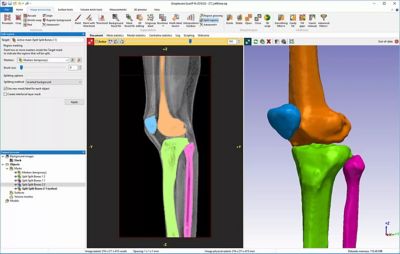
Quickly threshold image data to identify regions of interest
2. Make the Most of 3D Editing Tools to Enhance Segmentation
The 3D editing tools in Simpleware software give you more control over segmenting orthopedic data. There are many ways to manipulate image data, including the use of the 3D editing tool to identify specific regions of your model and apply filters to them locally, such as smoothing on parts of bone. For complex cardiovascular data, such as arteries, it is also straightforward to apply smoothing filters and remove any unwanted parts with intuitive shape-based drawing directly on your 3D model.
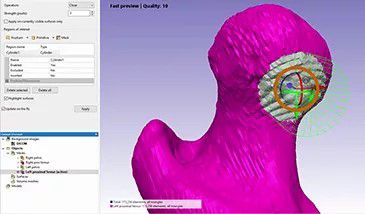
3D editing tools offer intuitive ways to segment data
3. Use Intuitive Tools to Solve Problems with Low-contrast or Poor-quality Data
CT data presents particular challenges for segmenting muscles using threshold tools due to low contrast results. To reduce time-consuming manual segmentation, the interpolation toolbox in Simpleware software enables you to combine 3D painting of scan data with a quick interpolation of the results to obtain the profile of the muscle. Similarly, with MRI data that is low-contrast, you can paint on a selection of slices in each view; a 3D wrap filter then creates a mask rather than having to paint on every single slice of the image data.
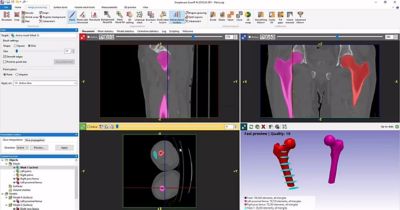
Interpolation tools in Simpleware Medical software
4. Use Creative Combinations of Tools to Better Process Cardiovascular Data
It can be difficult to work with artery walls when segmenting cardiovascular data. Simpleware software solves this problem by creating artificial walls using image processing tools. Morphological filters and Boolean operations make it possible to create an effective wall for blood flow analysis. This approach significantly cuts down on the time spent working with cardiovascular data to get usable results and enables a high level of detail and accuracy to be achieved without compromising the original geometry of the scan.
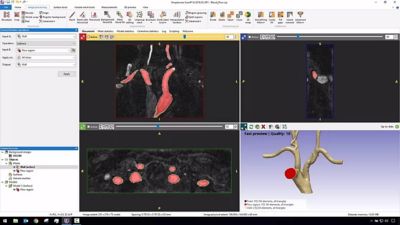
Segmentation of cardiovascular data with artery walls
5. Customize and Automate Workflows
Simpleware software can be augmented for specific workflows with small scripts. Scripting and customization options in the software can be useful to cut down on manual work. For example, if you are working with many similar datasets, scripting can often be used to automate repetitive tasks and reduce time of the segmentation.
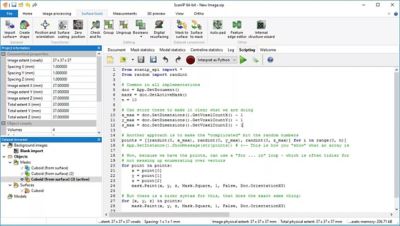
Use scripting to automate repetitive tasks
Learn more about Ansys Simpleware Medical.

The Advantage Blog
The Ansys Advantage blog, featuring contributions from Ansys and other technology experts, keeps you updated on how Ansys simulation is powering innovation that drives human advancement.