Skip to Main Content

Ansys Simpleware
3D Image Processing Platform

Complete 3D image processing and model generation platform that transforms volumetric imaging data ,eg CT and micro-CT, into design-ready, simulation-ready, and print-ready models.

IMAGE TO MODEL

Ansys Simpleware Accelerates Product Development Through Integrated Image Processing

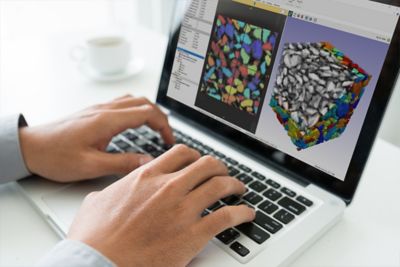
Ansys Simpleware software seamlessly processes 3D and 4D image data from volumetric imaging, eg CT and micro-CT scans. Advanced visualization, detailed analysis, and accurate quantification tools enable engineers to create precise models ready for design, simulation, and 3D printing workflows. Integrate imaging data directly into engineering workflows to reduce time-to-market while expanding modeling capabilities and enabling more true-to-reality insights.

  • Check icon outline
    Easy-to-learn intuitive interface
  • Check icon outline
    Fast, accurate complex data analysis
  • Check icon outline
    Generate simulation-ready models
  • Check icon outline
    Automate tasks with scripting
  • Check icon outline
    Fully supported by expert engineers
Simepleware Product Overview

Quick Specs

Simpleware software provides comprehensive 3D image processing, analysis, and model generation tools. Import image data, perform advanced segmentation, generate volume meshes, and export models for CAD, simulation, and 3D printing applications.

  • Image Import
  • Image-Based Meshing
  • 3D Printing Toolkit
  • 3D/4D Visualization
  • FEA/CFD Export
  • NURBS Modeling
  • CAD Integration
  • Measurements & Statistics
  • Scripting & Plugins


Applications

View All Ansys Applications

COMPREHENSIVE TOOLKIT

Complete Image Processing and Model Generation for Engineering Workflows

Simpleware software delivers an extensive selection of 3D image processing, analysis, and model generation tools for working with complex image data. Seamlessly handle challenges such as poor contrast, artifacts, and low-resolution images to achieve accurate results. Generate design-ready, simulation-ready, and print-ready models from any stacked image data, including CT, micro-CT, and other volumetric imaging sources. Automate repeatable workflows with scripting and plugins to accelerate product development and integrate imaging data into engineering design processes.

Ansys Simpleware


Key Features

Simpleware software provides six core capabilities from image import through model export for engineering applications.

  • Image Import, Visualization and Processing
  • Computer-Aided Design Integration
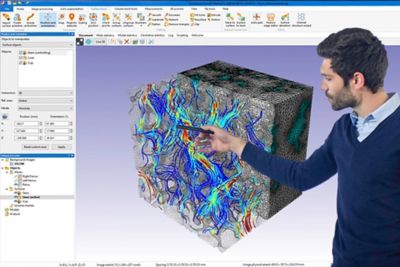
  • Image-Based Meshing for FEA and CFD
  • Measurements and Statistics
  • 3D Printing Toolkit
  • Scripting and Automation
  • Import image data from, CT, micro-CT, ultrasounics, FiB-SEM and 2D X-ray modalities
  • Co-registration of multiple 2D and 3D datasets
  • 3D live mode for instant updates during processing
  • Range of 2D and 3D visualization options
  • Overlay surface contours in 2D views
  • Interactive image reslicing with multiplanar reconstruction mode
  • Noise reduction, smoothing, and morphological filters
  • Align, rescale, and resample image data
  • Fast and easy-to-use tools to combine design and image data
  • Import design files (STL, IGES, STEP)
  • Automatic snap or landmark-based registration
  • Automatic NURBS patch fitting for highly accurate conversion
  • Export as STEP or IGES for further design work
  • Dedicated tools to cut, hollow, emboss text, and create connectors
  • Conforming multi-part volume meshes
  • Feature-based and user-defined mesh refinement
  • Per-part meshing controls for precise customization
  • Define contacts and node sets
  • Hounsfield material mapping for FE exports
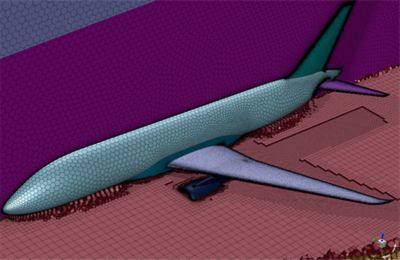
  • Boundary layer meshing for CFD applications
  • Dedicated native exports for all major solvers
  • Optimize element qualities against a choice of metrics
  • Import existing meshes and assign material properties
  • Segmentation checker to identify and fix problematic regions before meshing
  • Mesh quality histogram to inspect generated meshes
  • Simple quick statistics and measurements
  • Generate and probe centerline networks
  • 2D and 3D shape fitting and statistics
  • Wall thickness analysis
  • Calcuate surface deviation
  • Thoroughly interrogate image data, generated models, or centerlines
  • Extensive range of metrics for comprehensive analysis
  • Highly flexible for creating custom statistics templates
  • Generate PDF reports describing your data
  • Interactively measure and quantify data across a wide range of metrics
  • Tailored for both global and local regions of interest
  • Fiber orientation analysis
  • Rapidly convert imaging data into print-ready models
  • Efficiently prepare, analyze, and inspect models tailored for 3D printing
  • Export in a range of file formats for smooth transition from digital to physical part
  • Tools for cutting, hollowing, and embossing text
  • Create connectors and supports for 3D printing
  • Reduce manual input, freeing up engineering time
  • Efficiently process large numbes of datasets
  • Ensure consistent, repeatable results for repeated workflows
  • Convert expert, specialisist knowledge into usable tools
  • Customisable interface
  • Fully documented API supports macro recording, scipting and plug-in creating with Python and C#
  • Batch processing through command line

Ansys software is accessible

It's vital to Ansys that all users, including those with disabilities, can access our products. As such, we endeavor to follow accessibility requirements based on the US Access Board (Section 508), Web Content Accessibility Guidelines (WCAG), and the current format of the Voluntary Product Accessibility Template (VPAT).

现在就开始行动吧!

如果您面临工程方面的挑战,我们的团队将随时为您提供帮助。我们拥有丰富的经验并秉持创新承诺,期待与您联系。让我们携手合作,将您的工程挑战转化为价值增长和成功的机遇。欢迎立即联系我们进行交流。