Synopsys and Ansys power the future of innovation—connecting silicon to systems.

Next to providing one of the best test tools in the embedded sector, we also test software products on behalf of customers from the automotive industry, including driver assistance functions, drive components, control software for charging, and battery systems.
Over time, we have also experienced bugs in the testing process. To avoid process errors, we have developed various strategies and methods. Always with the goal to provide our customers with high-quality statements on their developments quickly.
In the following, we would like to explain one of these methods in detail. It was developed by our test engineers and is used daily in practice.
Objectives: The Purpose of the Method
Here’s a quick example of why this is so important.
In software that controls the exterior light of a vehicle, the exterior light should always be switched on when the light switch is in the ON position.
In the worst case, this requirement is only linked to test cases that never contained the condition light switch is in ON position. If these test cases successfully test another aspect, such as the light switch is off and the exterior light remains off, the linked requirement could be considered as sufficiently tested.
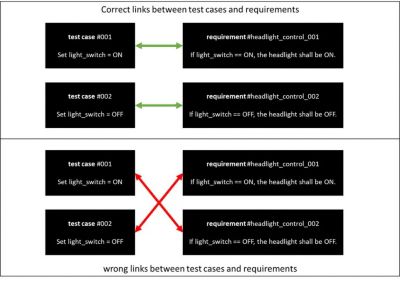
Incorrect links can occur in different ways:
- The tester creates a wrong link between test case and requirements
- An existing link loses its significance over time due to a change in the test item
There is a simple and quickly implementable solution that solves this problem.
In our method, each test case is reported as failed if it does not test the linked requirement correctly. A failure due to an incorrect link is detailed in the report. Our approach is essentially based on the possibility to define test data and expected values separately.
In the Ansys TPT embedded software test tool, the expected results of a test item, in this context we also speak of the test oracle, can be described with the help of Assesslets. Assesslets can be used for the evaluation of several test cases simultaneously.
Implementation: Five-Step Process
Step 1: Import of Requirements into TPT Software
Import can be done in several ways. For this method, it is only relevant that the requirements are available in TPT software.
Step 2: Creation of 1 Assesslet per Requirement
The purpose of an Assesslet is to specify the expected behavior of a test object under defined conditions. This single-source-of-truth definition can then be used for multiple test cases.To do this, create a new script Assesslet for each requirement in the Assesslet folder, name it accordingly and implement it.
The implementation of an Assesslet contains the following elements:
- Define conditions or case distinctions, usually derived from the requirements
- Define the expected value of each condition, some are simple, some are complex
- Add an annotation of which requirement is covered by which expected value
For our lights control example above, here is a reference implementation for an Assesslet that checks the requirement with the ID 2018: If light switch is ON, then headlight shall immediately be ON.

Assesslet to check requirements with ID 2018: Condition While the light switch is in position 1 (line 3). Our expected value is documented in line 4: TPT.CheckAlways() checks whether the headlight == true. With REQUIREMENTS.checked(), an attribute attached to the requirement with the ID “2018” is overwritten with the result (from line 4).
The procedure is the same for other requests.
Step 3: Creation of a Check Script
Another Assesslet script is then used to check whether all requirements linked to a test case have a defined attribute. In the case of the Assesslet, this is done by line 5 with the function REQUIREMENTS.checked(). When this is called, the default value is changed.
In other words, for each test case, for each requirement linked to that test case, we check the attribute for the default value. If the default is present, there is either no test Assesslet or an incorrect test Assesslet for the requirement.
Here is a reference implementation:
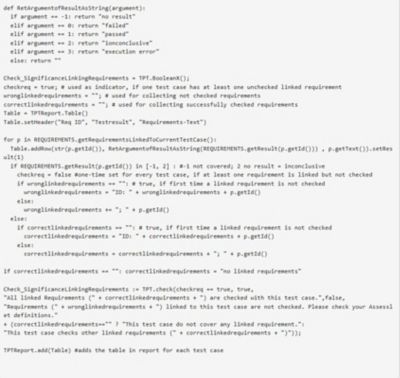
You need to move this script into the report section. Then it will run after the Assesslets to check the requirements.
Step 4: Creation of Test Cases
Test steps are made up of sequences of commands. These sequences are processed consecutively or in parallel. You can model test steps using hierarchies, conditional statements, parallel sequences, reactive behavior, or loops.
Signals are defined by assigning values, time-dependent synthetic functions, or by imported measurement data. You can embed or link measurement data from various file formats like *.csv, *.dat, *.mat, *.mf4, *.mdf, *.tptbin or *.xls in test step lists.
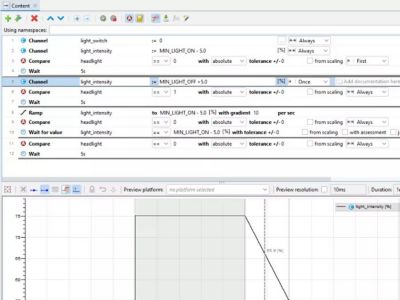
You use the Compare Step to check if a condition is true. Here: when the light_switch is set to “on,” check if the headlight is “on” too.
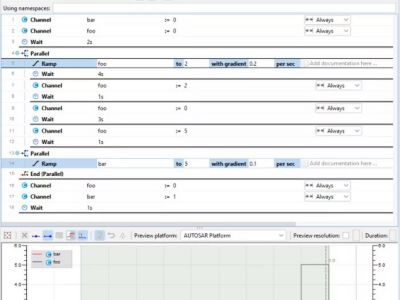
You can run test steps simultaneously. This feature complies with the parallel automatons in the graphical test modeling.
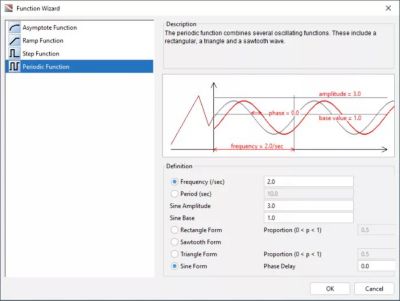
You can set up direct definitions as a single-line mathematical formula. Or you use the convenient Direct Definition Function Wizard.
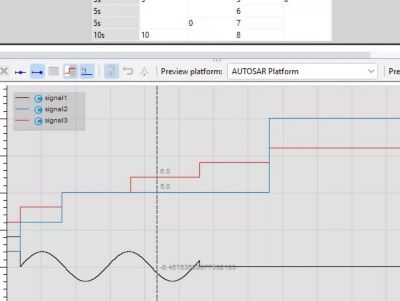
Simple table step in a test step list.
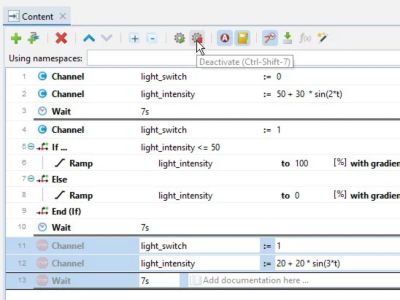
You can deactivate test steps in a test step list to exclude them from the test execution. You can, of course, activate them again easily.
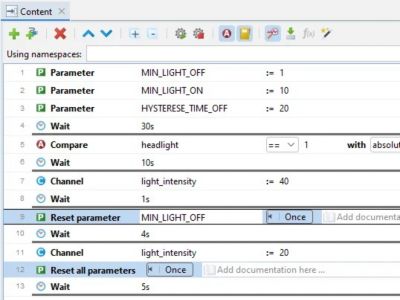
Inside a test step list, you can change parameter values, as well as reset single parameters or all parameters to their default value.
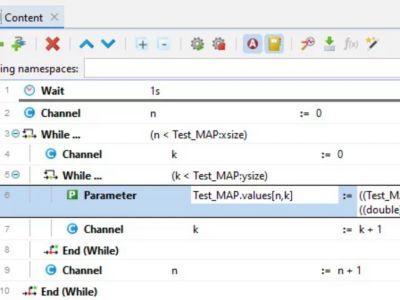
You can nest While steps inside a test step list.
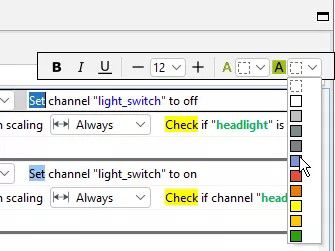
You can comment your test steps.
Step 5: Linking of Test Cases with Imported Requirements
The linking of requirements with tests or vice versa can be done by drag and drop. Select some test cases and drag them over the requirements.
Advantages of the Method
The advantage of this procedure is that incorrect links in the reporting are immediately and easily visible. Each incorrectly linked test case is identified as a failed test case in the report.
The report thus gives the user a quick overview of whether relevant test cases have been created for all requirements. At the same time, this increases productivity, as analyses of the degree of completion can be omitted.
Considerations for Applying the Method
Assesslets should be checked for correctness and consistency with requirements. Only if the Assesslets are correct do they have any significance. This is the actual engineering work in testing.
Further hints and recommendations:
In some of our projects, we do not link the script Assesslets directly to requirements. However, a mapping is done by naming convention: in that each requirement-testing script Assesslet has the following structure “Ass_” & <Requirements-ID>. The requirements for bidirectional traceability, such as from Automotive SPICE, are thus fulfilled in principle, as a pairing can be determined at any time.
Our method for ensuring the significance of tests is compliant with the requirements of Automotive SPICE and ISO26262.
In its application, it requires basic functions of the test automation used, such as the separation of test data for stimulation and a separate definition of expected behavior for the test object.
We have been using this method successfully in safety-critical automotive projects for several years.
Our engineers are convinced by the intuitive procedure and no longer want to do without it, among other things because time-consuming manual checks of the correctness of links can be omitted.
The effort required to write scripts and check them for the correctness of Assesslets and requirements is manageable and significantly lower than alternative measures such as reviews and walkthroughs.




The Advantage Blog
The Ansys Advantage blog, featuring contributions from Ansys and other technology experts, keeps you updated on how Ansys simulation is powering innovation that drives human advancement.