Synopsys and Ansys power the future of innovation—connecting silicon to systems.
-
-
Software gratuito per studenti
Ansys potenzia la nuova generazione di ingegneri
Gli studenti hanno accesso gratuito a software di simulazione di livello mondiale.
-
Connettiti subito con Ansys!
Progetta il tuo futuro
Connettiti a Ansys per scoprire come la simulazione può potenziare la tua prossima innovazione.
Customer Center
Supporto
Partner Community
Contatta l'ufficio vendite
Per Stati Uniti e Canada
Accedi
Prove Gratuite
Prodotti & Servizi
Scopri
Chi Siamo
Back
Prodotti & Servizi
Back
Scopri
Ansys potenzia la nuova generazione di ingegneri
Gli studenti hanno accesso gratuito a software di simulazione di livello mondiale.
Back
Chi Siamo
Progetta il tuo futuro
Connettiti a Ansys per scoprire come la simulazione può potenziare la tua prossima innovazione.
Customer Center
Supporto
Partner Community
Contatta l'ufficio vendite
Per Stati Uniti e Canada
Accedi
Prove Gratuite
The product development landscape is constantly evolving, driven by demands for faster time to market, innovation, collaboration, and real-time decisions. Engineering teams are increasingly adopting platforms that bring simulation into the design process earlier to enable faster iteration cycles, early concept validation, and improved accuracy and integrity.
Ansys Discovery 3D product simulation software delivers on this need by providing a rapid design exploration solution that transforms early-stage product development by producing fast, accurate predictions. Powered by an advanced graphics processing unit (GPU) solver, the Discovery application enables engineers to explore, refine, and validate designs effortlessly, helping them make better decisions earlier while driving innovation.
The first 2026 release brings improved physics capabilities and seamless connections to flagship Ansys solvers, making it easier than ever for engineers to explore concepts and validate ideas early to accelerate product development. With powerful, intelligent automation and productivity-focused improvements, this release focuses on delivering accuracy and efficiency — without slowing down designers.
Discovery software is designed for upfront simulation, bringing real-time physics into early design to guide better decisions from the first iteration.
Here’s a quick look at the innovations packed into Discovery 2026 R1.
Simulation and Physics Advancements
A key highlight of this release is the new conjugate heat transfer (CHT) feature with Joule heating capability. Engineers often face challenges when accounting for electrical heat generation during early thermal performance evaluation. They can now combine electrical conduction effects with CHT in a single setup for electronics cooling simulations. This workflow also supports free or forced convection cooling simulations. From busbars and fuses to conductors and electronic traces, this capability offers more realistic thermal predictions by accurately modeling internal heat sources.
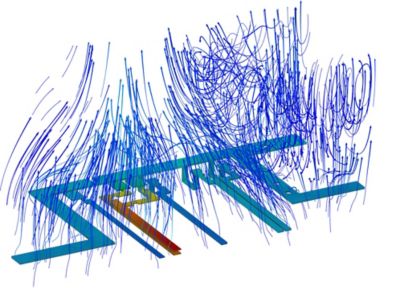
Busbar free convection cooling temperature
Fluid virtual walls streamline thermal modeling by enabling users to model thermal behavior between fluid regions without explicitly modeling thin solid walls. This approach reduces GPU memory use by eliminating thin solid regions from CHT models, such as heat exchangers, radiators, and other devices with thin baffles. Users can define the virtual wall between two fluid regions as either perfectly conducting or perfectly insulating, depending on the desired behavior.
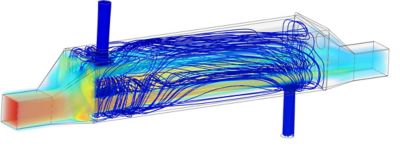
A shell and tube heat exchanger modeled with a perfectly conducting virtual wall
Meshing Enhancements
Discovery 2026 R1 introduces enhanced fluids meshing capabilities to improve accuracy and robustness by automatically resolving sharp edges and thin regions that are critical to flow and thermal behavior. Traditional fault-tolerant meshing can overlook sharp edges and thin regions, requiring manual refinement of critical areas and slowing early design exploration.
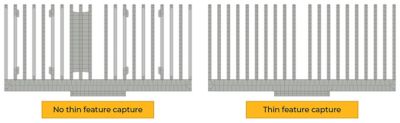
Better resolution of heat sink fins with thin feature capture, combined with sharp edge capture
The new program-controlled option for sharp edge capture automatically identifies and resolves edges associated with fluid and thermal conditions. This gives better resolution of inlets, outlets, fluid-fluid interfaces, and thermal conditions, thereby improving solution accuracy.
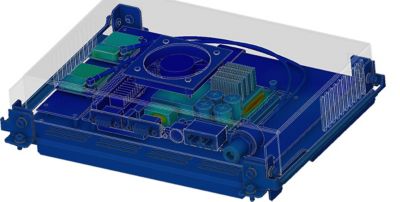
A capture thin structures screen controller example
Additionally, the capture thin structures option provides better resolution of thin structures, such as heat sink fins and narrow fluid channels, with fewer manual mesh controls.
Downstream Flagship Connections
Disconnected workflows often hinder the transition from fast concept studies to high-fidelity validation. This release also facilitates the seamless transfer of thermal, pressure, and electronics cooling data to flagship solvers with enhanced data transfer capabilities.
The transfer of electronics cooling models, including geometry, materials, and boundary conditions, to the Ansys Electronics Desktop (AEDT) electronics systems design platform enables upfront electronics cooling simulation in Discovery software with one-click transfer for final validation in the AEDT platform’s Ansys Icepak electronics cooling simulation software.
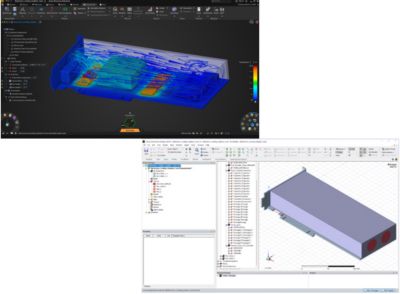
The transfer of thermal and static pressure data from CHT or thermal simulations to Ansys Mechanical structural finite element analysis software improves flexibility and accuracy for thermal and thermal-stress workflows in the Mechanical application.
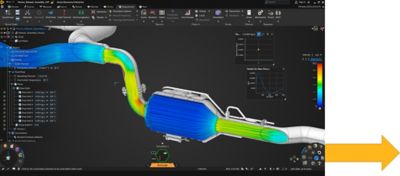
Ansys Discovery 3D product simulation software conjugate heat transfer (CHT) simulation
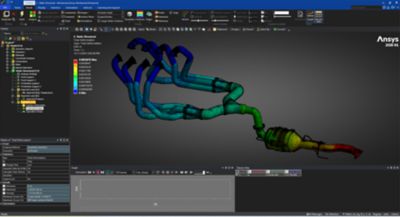
Ansys Mechanical structural finite element analysis software thermal-stress simulation with applied volumetric temperature and static pressure data
Geometry Detection Enhancements
Geometry detection enhancements help identify problematic features and small parts, improving mesh and model preparation prior to simulation. These capabilities enable engineers to identify potential meshing issues early in the workflow and better organize the model for downstream simulation, reducing the round-tripping between Discovery software and the flagship applications.
The detect sliver faces tool helps identify faces in a specified angle range that contain sharp angles likely to negatively impact meshing.
The fasteners tool uses artificial intelligence (AI)-driven identification to automatically detect fasteners, such as bolts, nuts, or washers, in the model. Users can additionally adjust the search confidence levels for the different fastener types and reclassify them into the correct categories as needed.
For additional model cleanup, edges or vertices can be marked as suppressed so they will not be considered in downstream applications, such as the Mechanical application. This helps avoid problematic mesh elements or unnecessary refinement. Some repair tools also include the additional option to suppress topologies, permitting extra edges or vertices in the model to be marked as suppressed.
Sensitivity Analysis and Optimization
Sensitivity analysis quantifies how variations in input parameters affect simulation outputs, helping teams make more informed design decisions. This capability enhances the evaluation of parameterized inputs on outputs and supports early-stage design trade-off evaluation. The analysis results are presented as a predictive approximation quality and sensitivity matrix while the functional relationship between two inputs and a selected output (response) is visualized as a 3D interactive response surface plot. Together, these tools assist in deciding whether to continue with the current approximation model or whether additional sampling data or inputs are needed for improvement. This workflow enables rapid, one-click optimization for parametric models.
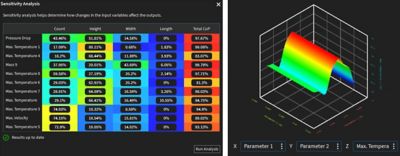
Sensitivity analysis and response surface
Usability and Workflow Improvements
The Discovery application's default user interface (UI) themes are now enhanced versions of the classic dark and light UI themes. These upgraded themes improve model and results visibility, standardize color use, improve contrast, and resolve past inconsistencies.
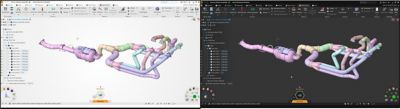
Discovery software’s 2026 R1 user interface (UI) display
The newly introduced query editor feature lets users create queries for generating selection sets, which can be associated with a named selection. Enter data in the query editor rows to define a selection set, and refine the selection by adding, removing, or filtering entities from the selection.
Beams assignment now supports multiple functions, streamlining the creation of beam geometry and the application of beam profiles. Users can assign standard or custom profiles to curves, generate beam paths by chaining vertices, or create connecting curves between vertex pairs.
Modeling tool enhancements include support for automatic dimensions in the sketch tools, as well as improved display of dimensions and constraints. Updates to history tracking include more robust handling of sketch blocks, support for additional tools, and a better, more efficient geometry parameterization workflow.
Discovery 2026 R1 marks a significant step forward in how engineers approach simulation and design. With advancements such as CHT with Joule heating and fluid virtual walls, smarter meshing, and intuitive AI-guided workflows, this release empowers engineers to explore more ideas, iterate faster, and deliver high-impact results earlier in the product development cycle.
Learn more by registering for “What’s New in Ansys Discovery 2026 R1,” a webinar covering the newest Discovery capabilities and upfront simulation workflows.

Just for you. We have some additional resources you may enjoy.
Watch the Webinar!
Learn more by registering for “What’s New in Ansys Discovery 2026 R1,” a webinar covering the newest Discovery capabilities and upfront simulation workflows.

The Advantage Blog
The Ansys Advantage blog, featuring contributions from Ansys and other technology experts, keeps you updated on how Ansys simulation is powering innovation that drives human advancement.