Synopsys and Ansys power the future of innovation—connecting silicon to systems.
-
-
Accédez au logiciel étudiant gratuit
Ansys donne les moyens à la prochaine génération d'ingénieurs
Les étudiants ont accès gratuitement à un logiciel de simulation de classe mondiale.
-
Connectez-vous avec Ansys maintenant !
Concevez votre avenir
Connectez-vous à Ansys pour découvrir comment la simulation peut alimenter votre prochaine percée.
Espace client
Support
Communautés partenaires
Contacter le service commercial
Pour les États-Unis et le Canada
S'inscrire
Essais gratuits
Produits & Services
Apprendre
À propos d'Ansys
Back
Produits & Services
Back
Apprendre
Ansys donne les moyens à la prochaine génération d'ingénieurs
Les étudiants ont accès gratuitement à un logiciel de simulation de classe mondiale.
Back
À propos d'Ansys
Concevez votre avenir
Connectez-vous à Ansys pour découvrir comment la simulation peut alimenter votre prochaine percée.
Espace client
Support
Communautés partenaires
Contacter le service commercial
Pour les États-Unis et le Canada
S'inscrire
Essais gratuits
Whether you’re just getting started with Ansys Fluids or you’ve been using software from Ansys, part of Synopsys, for years, Ansys 2025 R2 delivers powerful capabilities designed to help you solve more complex problems faster and with greater confidence.
Ansys Fluids 2025 R2 delivers significant advancements across the portfolio, with improvements in solver physics, graphics processing unit (GPU) acceleration, and multiphysics coupling. This update is designed to extend accuracy, expand physics coverage, and unlock unprecedented performance at scale.
Watch the Ansys Fluids 2025 R2 “What’s New” webinar on demand to learn more.
Expanding the Fluids Portfolio
Ansys Fluids spans a wide range of solvers and tools, including:
- Ansys Fluent fluid simulation software
- Ansys CFX computational fluid dynamics (CFD) software
- Ansys Rocky particle dynamics simulation software
- The Ansys Thermal Desktop thermal-centric modeling platform
- Ansys FreeFlow smoothed-particle hydrodynamics (SPH) software
The 2025 R2 updates continue to push boundaries across these solutions, with three themes in mind:
- Speed: leveraging multi-GPU acceleration for massive performance gains
- Accuracy: adding models and methods that capture real-world physics with precision
- Integration: strengthening coupling between solvers to enable true multiphysics workflows
Spotlight on FreeFlow Software: A New Era for SPH
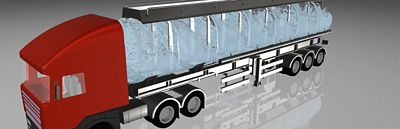
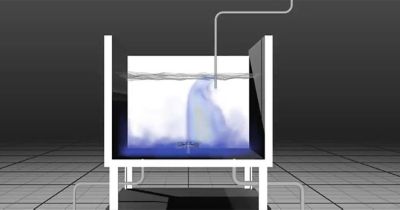
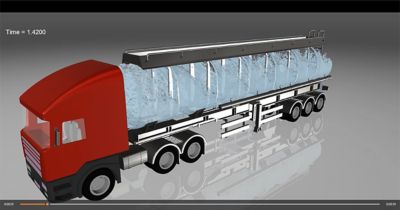
FreeFlow software, introduced this year, is the newest member of the Fluids family and focuses on free-surface flow simulations using SPH. Unlike mesh-based CFD, SPH uses particles to capture liquid behavior — ideal for complex moving geometries like washing systems, oil cooling in electric machines, low-speed gearboxes, or liquid sloshing in tanks.
Tank sloshing
- Surface tension modeling: The physics-based model enables accurate droplet formation, wetting, and film behavior. This is critical for applications, such as spray cooling, oil distribution in e-motors, or cleaning processes.
- Multi-GPU execution: FreeFlow software now scales across multiple GPUs, making large-domain simulations of 5 million surface triangles feasible with improved turnaround time.
- Two-way coupling with Ansys Mechanical software: Bidirectional force and thermal transfer support fluid-structure interaction (FSI) workflows, such as tank sloshing and thermally induced deformation.
- Complex geometry handling: Enhanced preprocessing and solver robustness support cases with intricate computer-aided design (CAD), enabling faster setup for industrial-scale systems.
These advances make FreeFlow software particularly powerful for industries exploring free-surface processes, including liquid cooling in early design stages.
Rocky Software: Advanced Particle Mechanics
Rocky software remains the market leader in discrete element modeling (DEM). In 2025 R2, Rocky software extends its realism and breadth of applications.
Deformable particles in tablet compaction
Highlights in 2025 R2:
- Enhanced contact models: implementation of the Edinburgh Elasto-Plastic-Adhesion (EEPA) model targeting particulate materials subjected to compression, resulting in an increased adhesion effect between particles due to contact area enlargement caused by plastic deformation like pharmaceutical compaction, additive manufacturing, and food processing
- Deformable particles (preview feature): support for spherical and nonspherical particles undergoing elastic/plastic deformation and breakage. This broadens DEM coverage to compaction, calendering, and particle-crushing workflows.
- Thermal coupling with Fluent software: Semiresolved heat transfer between DEM particles and CFD fields now supports turbulent flows. Examples include heat transfer in frying processes or bulk granular heating.
- Two-way structural coupling with DEM: Rocky software sends the DEM forces to Mechanical software, which calculates deformations and sends the displacements back to Rocky software.
The integration of Rocky software with Fluent software and Mechanical software enables you to effectively solve complex simulation challenges by using GPU-powered multiphysics solutions.
Access Rocky tutorials at the Ansys Innovation Space.
Fluent Software: Accelerating CFD With GPUs, Artificial Intelligence (AI), and Built-In Optimization
The GPU-native solver in Fluent software continues to remain the cornerstone of driving CFD studies at speed and scale at Ansys.
New physics and workflows available in 2025 R2 include:
- Free-surface modeling: The volume of fluid (VOF) solver is now GPU-enabled, supporting sliding mesh, multiple reference frames, and non-Newtonian flows.
- Species transport: Multimixture species transport models now run on GPUs, enabling chemically reacting and mixing flows at reduced cost.
- Combustion and CHT: The flamelet-generated manifold (FGM) and premixed combustion models are now GPU-compatible with conjugate heat transfer (CHT). An example is combustor liner CHT with reacting flow.
- Radiation: The surface-to-surface radiation model achieves a 2X to 2.5X speedup on GPUs versus the prior release, with added sliding mesh compatibility.
- Turbomachinery: GPU workflows now include full-wheel transient large eddy simulations (LESs) (more than 100 million cells), validated in the European Union Sci-Fi-Turbo project.
KHI case: Kawasaki Technology Co. Ltd. applied an Ansys Fluent graphics processing unit (GPU) solver for flashback prediction of hydrogen-methane blends in their industrial gas turbine combustor. Recently, detailed chemistry simulation for this case in Fluent 2025 R2 using GPUs demonstrated eight to 10 times speedup compared with central processing unit (CPU) configuration while maintaining high-fidelity physics.
Ansys 2025 R2 also introduces the Ansys Engineering Copilot tool, an AI-driven in-product assistant. Built on AnsysGPT technology, the Engineering Copilot tool integrates training, knowledge articles, and support directly into Fluent software’s desktop interface — helping both new and experienced users find answers faster, track technical support requests, access knowledge resources, and more.
Ansys Engineering Copilot tool plus Fluent demo: The Engineering Copilot tool is available in 2025 R2 directly in the Fluent desktop interface at no extra cost. Download 2025 R2 at the Ansys customer portal.
On top of that, Fluent software now embeds Ansys optiSLang postprocessing natively into the Fluent desktop interface. This reduces the need to jump between separate applications, enabling postprocessing of your parametric studies directly in Fluent software. Engineers can now:
- Define input parameters and outputs of interest — for example, the drag coefficient, pressure drop, and heat transfer rate — directly in Fluent software’s parametric workflow.
- Launch design of experiments (DOE) studies to systematically explore how input variations influence outputs.
- Embed parameter plots, anthill plots, history plots, and parallel coordinate plots directly in Fluent software.
- Leverage improved automated parametric reports in HTML, PDF, or PowerPoint format, with design point tables and filtered plots embedded in PowerPoint reports as edited items.
Finally, rapid octree meshing is now available directly in the Fluent meshing capability, enabling scalable meshing of more than 1 billion cell grids in under an hour across thousands of CPU cores. Seamless integration with GPU solver workflows accelerates turnaround for high-resolution models.
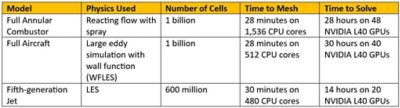
Combining rapid octree meshing with the Fluent GPU solver results in impressive meshing and simulation speeds.
CFX Software: Advancing Turbomachinery Simulation
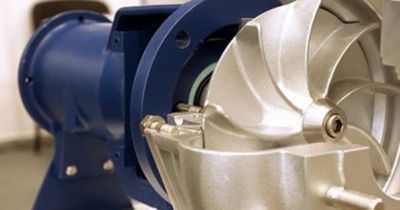
CFX software remains the reference standard for rotating machinery, trusted for its robustness and predictive accuracy in compressors, turbines, pumps, fans, and more. CFX software continues to lead with validated, production-ready workflows that address the full range of turbomachinery challenges, including aeroelasticity, harmonic balance, and transient rotor-stator interactions. Ansys 2025 R2 further strengthens CFX software for high-fidelity design and validation.
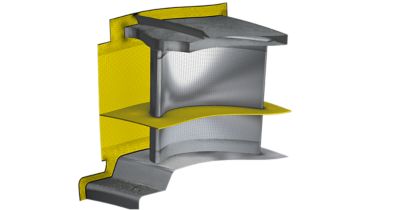
Hybrid meshing is available in Ansys TurboGrid turbine blade meshing software.
Key updates in 2025 R2 include:
- Improved hybrid meshing is now included in Ansys TurboGrid turbine blade meshing software, providing automated meshing for complex blade designs.
- Turbine CHT setup is now simplified in CFX software, with domain interfaces enabling mixed fluid-fluid and fluid-solid connections.
- Aeromechanic enhancements (available in preview) in CFX software now include a built-in calculation of generalized force on boundaries, enabling users to better assess the convergence of the forcing term in a forced response calculation.
- CFX at flow boundaries (preview feature) can be coupled with other solvers via system coupling. This is useful for connecting turbomachinery components in CFX software with upstream/downstream models in Fluent software or multiple CFX instances.
Access Ansys’ turbomachinery mini webinar series to learn more.
Thermal Desktop Software: Strengthening System-Level Thermo-Fluids
Thermal Desktop software provides fast, system-level modeling of transient thermal and fluid processes and is widely used in space, aerospace, electronics, and renewable energy. It bridges early-stage design with detailed component analysis, offering radiation, conduction, and fluid modeling in a single environment. With 2025 R2, Thermal Desktop software enables engineers to simulate entire thermal-fluid networks more efficiently.
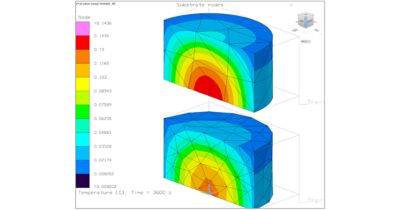
Quadratic thermal elements
Key updates in 2025 R2 include:
- Pipes and solids: enables efficient simulation of fluid flow through solid structures by eliminating the need to mesh pipe geometries, making it especially effective for modeling compact cooling channels and streamlining the overall workflow.
- Quadratic thermal elements: introduces second-order thermal elements to deliver more accurate temperature distributions and enhance the precision, particularly on coarse meshes.
- Integration with optiSLang software: The Thermal Desktop node is now fully exposed in optiSLang software for optimization workflows. New output parameters (called symbols in Thermal Desktop software) are available in the solver.
- TD Designer (a new geometry and meshing tool): Introduced as a preview feature, TD Designer replaces TD Direct with a new geometry and meshing environment built on the Ansys Discovery platform, offering enhanced modeling capabilities, support for thermal data tagging, and seamless two-way integration with Thermal Desktop software.
Access the Thermal Desktop webinar series to learn more.
For new users, these updates lower the barrier to entry and include intuitive workflows, AI assistance, and prebuilt training to ensure faster ramp-up. For experienced users, performance gains and new physics models open the door to simulations once considered impossible.
And across industries — from aerospace and energy to semiconductors — Ansys Fluids products continue to help engineers predict real-world performance with confidence.
Next Steps
- Watch the full webinar replay.
- Explore detailed release notes via the Ansys Customer Portal.
- Try the new capabilities by downloading 2025 R2 from the Ansys Download Center.

The Advantage Blog
The Ansys Advantage blog, featuring contributions from Ansys and other technology experts, keeps you updated on how Ansys simulation is powering innovation that drives human advancement.