Synopsys and Ansys power the future of innovation—connecting silicon to systems.
-
-
Accédez au logiciel étudiant gratuit
Ansys donne les moyens à la prochaine génération d'ingénieurs
Les étudiants ont accès gratuitement à un logiciel de simulation de classe mondiale.
-
Connectez-vous avec Ansys maintenant !
Concevez votre avenir
Connectez-vous à Ansys pour découvrir comment la simulation peut alimenter votre prochaine percée.
Espace client
Support
Communautés partenaires
Contacter le service commercial
Pour les États-Unis et le Canada
S'inscrire
Essais gratuits
Produits & Services
Apprendre
À propos d'Ansys
Back
Produits & Services
Back
Apprendre
Ansys donne les moyens à la prochaine génération d'ingénieurs
Les étudiants ont accès gratuitement à un logiciel de simulation de classe mondiale.
Back
À propos d'Ansys
Concevez votre avenir
Connectez-vous à Ansys pour découvrir comment la simulation peut alimenter votre prochaine percée.
Espace client
Support
Communautés partenaires
Contacter le service commercial
Pour les États-Unis et le Canada
S'inscrire
Essais gratuits

Engineering teams today are under increasing pressure to simulate more physics at higher fidelity and in less time. Whether you’re modeling turbulent combustion, particle-fluid interactions, or system-level thermal behavior, the challenge is the same: How do you scale complexity without sacrificing turnaround time or accuracy?
The latest updates across the Ansys Fluids portfolio directly address this through graphics processing unit (GPU) acceleration, deeper multiphysics coupling, and targeted solver enhancements.
Let's look at the solver enhancements across some of the major Ansys Fluids products, including:
- Ansys Fluent fluid dynamics simulation software
- Ansys CFX turbomachinery simulation software
- Ansys Rocky particle dynamics simulation software
- Ansys FreeFlow smoothed-particle hydrodynamics (SPH) simulation software
- Ansys Thermal Desktop thermal and fluids analysis software
Watch the “Ansys 2026 R1: Ansys Fluids What’s New” webinar on demand to learn more.
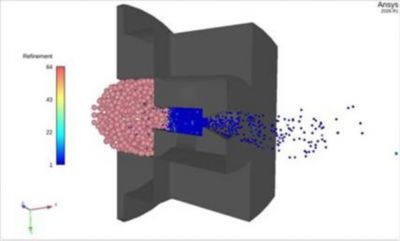
Adaptive size enhances performance in cases with a lot of particles or in situations where you need small particles in a region of interest (ROI).
Faster, Mesh-Free SPH With FreeFlow Software
For applications dominated by large deformation, free surfaces, or complex moving geometries, traditional mesh-based computational fluid dynamics (CFD) approaches can quickly become limiting. FreeFlow software addresses this by leveraging SPH, and recent enhancements significantly improve both its performance and practicality.
A major step forward is the introduction of incompressible SPH (ISPH) as the default formulation, delivering substantial speed improvements for production workflows. At the same time, adaptive particle refinement introduces a level of control that mirrors mesh adaptation in CFD — targeting resolution where it matters most.
Key advancements in FreeFlow software in 2026 R1 include:
- ISPH as default, enabling order-of-magnitude speedups
- Adaptive particle sizing, improving accuracy in critical regions without increasing overall cost
- Expanded boundary conditions, including time-dependent and periodic setups
- Faster initialization, especially for large-scale particle simulations
- Improved coupling, with Fluent software, Ansys Mechanical structural finite element analysis software, and Ansys optiSLang process integration and design optimization software for multiphysics and optimization
Together, these enhancements make FreeFlow software a more practical tool for applications, such as lubrication, sloshing, and fluid-structure interaction, especially when meshing becomes a bottleneck.
Interested in trying FreeFlow software? Request a 30-day free trial.
Speed, Usability, and Accuracy Enhancements With Rocky Software
Rocky software continues to evolve as a high-performance discrete element method (DEM) solution, particularly for industries where particle behavior drives system performance. The focus here is on balancing realism with computational efficiency.
Rocky 2026 R1 enhancements include:
- One-way free surface coupling, enabling fluid effects on particles without explicitly solving the fluid field
- Volume of fluid (VOF) plus DEM coupling, enabling more accurate particle-free surface interaction
- GPU and distributed scaling, improving performance for large particle counts
- Faster particle injection and post-processing, reducing workflow overhead
- Improved usability, with streamlined setup via Ansys Engineering Copilot
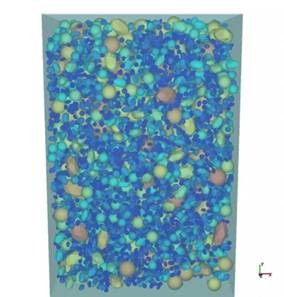
The one-way free-surface module enables you to incorporate free-surface physics for liquids in a simplified discrete element method (DEM) framework.
These capabilities expand Rocky software’s role beyond stand-alone DEM, enabling more efficient simulation of particle-fluid systems, such as mixing, coating, and bulk material handling, with significant speedups thanks to GPU acceleration.
Learn more details about Rocky 2026 R1 software updates.
Fluent Software: GPU Physics Expansion, Workflow, and Usability Improvements
As an industry-leading CFD solver, Fluent software already supports a wide range of physics, from turbulence and heat transfer to combustion and multiphase flows. The latest updates focus on bringing more of these capabilities to the Fluent GPU solver while maintaining accuracy.
New Physics Supported on the Fluent GPU Solver
Flow and blend visualization using the Ansys Fluent fluid simulation software graphics processing unit (GPU) solver
- VOF with energy and sliding mesh is now available, enabling faster multiphase flow simulations for applications like mixing, rotating machinery, and more.
- Broader support for combustion studies with chemistry acceleration that delivers up to two to three times faster solve times for stiff reaction mechanisms and beta support for pollutant post-processing, including thermal NOx.
- Electric potential and electrochemistry capabilities in 2026 R1 now include support for the conjugate heat transfer (CHT) coupling method, a battery reduced-order model (ROM) tool kit, and thermal abuse models, including 1-, 4- and n-equation.
- Full support for turbulence models (including LES) with improved wall modeling and roughness capabilities.
Performance Improvements
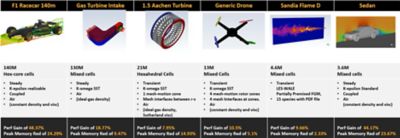
Performance and memory improvements using hybrid precision in the Fluent software GPU solver in 2026 R1
- Hybrid precision on GPU reduces memory footprint while maintaining accuracy, enabling larger simulations to run on fewer GPUs.
- Support for the latest NVIDIA and AMD GPUs with improved scaling.
- Enhanced GPU-to-GPU communication for better scaling.
Usability Enhancements

Faster meshing is available with multithreaded surface meshing in 2026 R1 in the Fluent GPU solver.
- GPU-enabled expressions for greater flexibility and reduced reliance on user defined functions (UDFs)
- Accelerated post-processing, including GPU-based volume rendering and animations
- New capabilities for watertight meshing on GPU, including parallel region compute, extrude volume mesh, improved nonconformal mesh, and multithreaded surface meshing (beta) for dramatically faster preprocessing
Request a 30-day trial of the Fluent GPU solver.
CFX Software: Advancing Turbomachinery Performance and Aeromechanics Workflows
CFX software remains a trusted solution for turbomachinery applications. Its strength lies in delivering robust, highly accurate results with minimal user intervention, making it particularly well-suited for automated workflows and certification-driven environments.
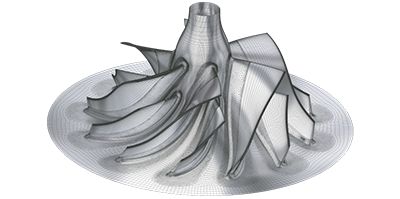
Hybrid meshing extended to compressors with splitter blades
In 2026 R1, CFX software enhancements include:
Enhanced hybrid meshing in TurboGrid
Hybrid meshing capabilities have been expanded to better handle complex blade geometries by combining the traditional block-structured hex mesh with localized unstructured regions. This makes it easier to capture challenging features, such as large fillets and blade blends, and is now compatible with splitter blades for improved compressor modeling.
New generalized modal force for aeromechanics
A new generalized modal force capability enables users to compute and monitor the integrated force acting on blades. This provides a reliable metric for identifying pseudo-convergence and enables more accurate transfer of aerodynamic forcing data into Mechanical software for forced-response analyses.
Improved harmonic analysis convergence with the GMRES solver
A new GMRES (generalized minimal residual) solver option has been introduced to improve convergence in difficult harmonic analysis cases, particularly at larger pseudo time steps. The solver activates intelligently only when needed, helping balance robustness with computational efficiency.
Expanded moist air modeling capabilities
Mass transfer modeling has been enhanced to permit interactions between individual components in the gas and liquid phases. This enables more realistic simulation of condensation processes in applications, such as steam turbines, compressors, and heating, ventilating, and air-conditioning (HVAC) systems. (Note: This feature is in beta.)
Introduction of PyCFX for automation
The release of PyCFX, a Python interface for CFX software, marks an important step toward greater automation and customization. While compatible with earlier versions, we recommend using PyCFX with 2026 R1.
Download PyCFX from https://github.com/ansys/pycfx.
Access CFX documentation to learn more.
Thermal Desktop Software: Faster, Smarter System-Level Thermal Modeling
Thermal Desktop software continues to strengthen its role as a fast, system-level thermal and fluid modeling solution designed to complement high-fidelity CFD tools. Unlike traditional 3D CFD approaches, Thermal Desktop software enables efficient modeling across multiple levels of fidelity — from 0D lumped parameters and 1D flow networks to 2D surfaces and 3D finite element models — making it especially well suited for large-scale systems. This flexibility enables engineers to simulate complex applications, such as coolant loops, cryogenic systems, orbital thermal environments, and phase-change processes, often with solve times measured in seconds to minutes rather than hours.
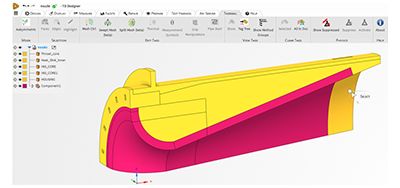
TD Designer is a stand-alone application based on Ansys Discovery 3D product simulation software, replacing TD Direct plus Ansys SpaceClaim 3D computer-aided design (CAD) modeling software.
2026 R1 introduces several important updates that improve preprocessing, meshing, and radiation modeling capabilities:
- TD Designer replaces legacy preprocessing tools
A new preprocessing environment, TD Designer, replaces the previous Ansys SpaceClaim 3D computer-aided design (CAD) modeling software-based TD Direct workflow. Built in Ansys Discovery 3D product simulation software, TD Designer provides a more modern and integrated experience while maintaining key capabilities, such as domain decomposition and tagging. It also retains a bidirectional connection with Thermal Desktop software, allowing seamless data transfer between preprocessing and simulation. - Enhanced meshing with Ansys, part of Synopsys, technology
Meshing is now powered by Ansys meshing technology rather than third-party libraries, supporting hex-dominant, multizone, and swept meshing methods. This results in improved robustness, higher-quality meshes, and better overall model fidelity — particularly important for complex system-level simulations. - Participating media radiation modeling
Thermal Desktop software now supports participating media in radiation simulations, enabling energy absorption and emission in solid elements. This is especially useful for modeling optically thick materials, such as glass or certain gas flows, enhancing accuracy in radiative heat transfer analyses (currently supported for thermal solids).
Overall, these updates make Thermal Desktop 2026 R1 more robust, more integrated in the Ansys ecosystem, and better equipped to handle complex system-level thermal challenges with improved accuracy and efficiency.
Want to explore Thermal Desktop software? Get started with a 30‑day free trial.
Learn More




The Advantage Blog
The Ansys Advantage blog, featuring contributions from Ansys and other technology experts, keeps you updated on how Ansys simulation is powering innovation that drives human advancement.