Synopsys and Ansys power the future of innovation—connecting silicon to systems.
-
-
Access Free Student Software
Ansys empowers the next generation of engineers
Students get free access to world-class simulation software.
-
Connect with Ansys Now!
Design your future
Connect with Ansys to explore how simulation can power your next breakthrough.
Free Trials
Products & Services
Learn
About
Back
Products & Services
Back
Learn
Ansys empowers the next generation of engineers
Students get free access to world-class simulation software.
Back
About
Design your future
Connect with Ansys to explore how simulation can power your next breakthrough.
Free Trials

We recently explained automating workflows in Ansys Simpleware software. We talked about scripting in Simpleware software to achieve better automation of repetitive tasks and showed how Simpleware software can be augmented for specific workflows with small scripts. Expanding on the topics covered in the webinar, we would like to share some of the code demonstrated.
Creating a Custom Filter
We looked at creating a custom filter, and wrapping it in a Simpleware command:
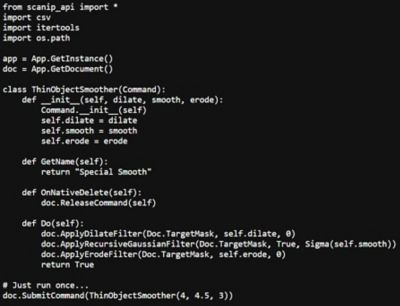
The great advantage of commands is that they fit nicely into the Simpleware undo stack, meaning for complex operations performed via scripting, a single undo (Ctrl+Z) will undo every operation performed. Creating atomic operations like this greatly simplifies user-operation further down the line. After creating the simple command, we added this to the interface via a UserAction:
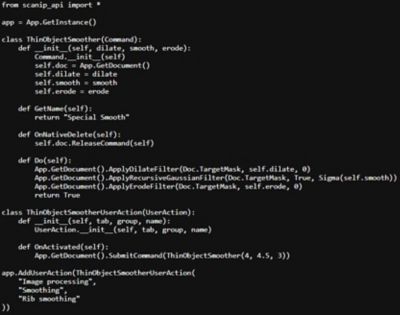
Using this pattern, it is incredibly simple to enhance the Simpleware interface to include any custom functionality you might require. The usefulness of this technique is much more evident when conducting repetitive operations, such as when you have many, very similar samples of similar items.
When using Simpleware software for one-off research projects, scripting can be used to ensure that the parameters you are using are the best parameters to achieve the result that you are trying to achieve. The workflow for this would be:
- Establish what a "good result" is, and be able to measure it.
- Establish what parameters to modify.
- Write code to take parameters as inputs and measure the quality of the output.
- Loop over parameters.
Optimizing Values and Fine-tuning Parameters
We focused on optimizing the values given to the rib-smoothing filter. Another exciting application of this technique is fine-tuning meshing parameters, in a mesh-convergence study or similar. The code relevant to this is quite trivial:
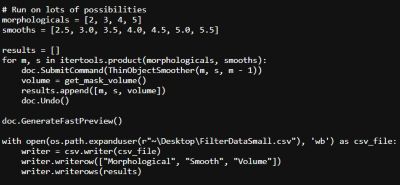
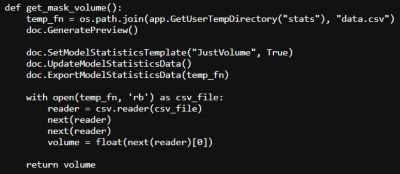
In fact, the difficulty we encounter here is measuring the volume; as the quick statistics are considered proxies to the Simpleware software statistics, we write a small method to get the volume of an active mask:
Setting up a GUI
Finally, we touched on the creation of a GUI within Simpleware software:
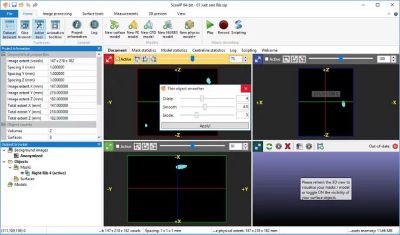
Hopefully, this provided a basic framework for writing GUI-enhanced filters within the Simpleware software framework.
Learn more about Ansys Simpleware software.



The Advantage Blog
The Ansys Advantage blog, featuring contributions from Ansys and other technology experts, keeps you updated on how Ansys simulation is powering innovation that drives human advancement.